Overview
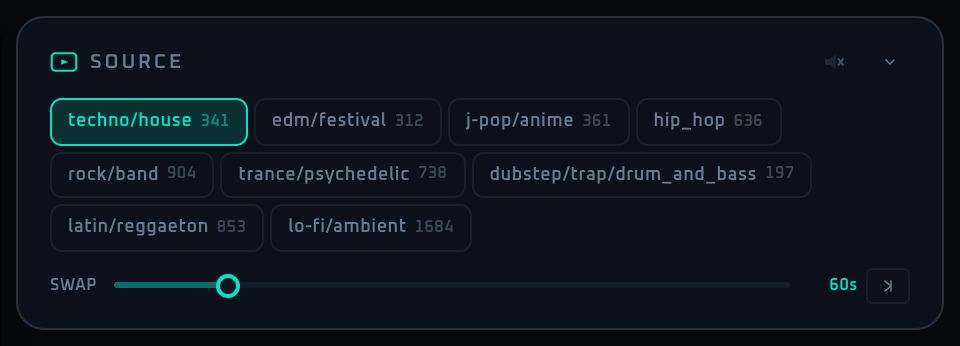
The Source panel is the entry point for the main visual bed. It loads pre-curated VJ clip groups by genre, which keeps the show more stable and easier to operate in a venue. In practice, this is where you decide the overall texture of the room before adding filters, shaders, lyrics, or branding on top.
Because the selection is genre-based, the result is broader than a single clip change. It affects how aggressive the motion feels, how readable overlays remain, and how well later automation features behave. A reliable workflow is to set the visual mood here first, then use Filters and Shader as the second layer of refinement. The SWAP value is especially important: shorter values feel more active, while longer values make the room calmer and more continuous.
Control Reference
- None (no video)
Selecting "None" at the start of the list shows no curated video at all. The output goes to a black background and auto-advance (SWAP) stops. Use it when you want only lyrics, MV, or a logo on black, or to blank the visuals. Pick any genre again to bring the video back instantly.
- Genre buttons (multiple)
Switch the curated playlist group. Clicking a button loads that genre's clip set, and the visible clip is replaced when the current one finishes. The small number on the right shows how many clips are currently registered for that genre. The video audio is always muted (fixed, so clip BGM never leaks into the room).
- SWAP slider
Sets the maximum playback length per clip, from 15 to 300 seconds in 5-second steps (default 60 s). If the clip itself is shorter, it switches at its own length, so this value acts as an upper bound. Up-tempo nights work well around 30 to 60 seconds; lounge or ambient sets often prefer 90 to 180. Hidden while "None" is selected.
- Collapse arrow (top right end)
Minimizes the panel. The state is persisted and survives reloads.
When To Use It
If the room mood needs to change quickly, the Source panel is usually the safest first move. It changes the overall visual character without requiring detailed parameter tuning. For lyric-heavy or information-heavy moments, choose a simpler source style so text overlays and DJ name graphics stay readable.
If a workflow is unclear or missing, let us know through the contact form.
Automation-oriented features such as auto lookup and auto rotation unlock with Event Pass.