Overview
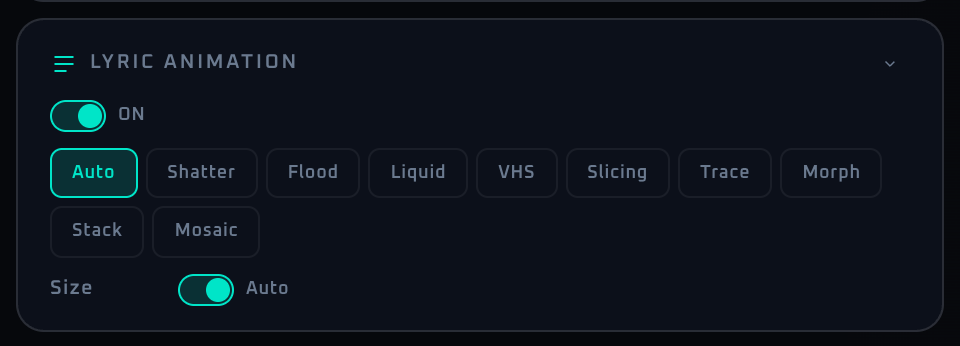
The Lyrics panel is a simple picker for how the recognized song's lyrics are animated. All the fine details (size, letter spacing, font, timing) are optimized automatically, so there are only two things to touch: the display ON/OFF and the animation type.
Lyrics come from LRCLIB, and only time-synced (timestamped) lyrics are displayed. Lyrics without timestamps drift out of position in a live set, so they are not shown and are treated as "not found". Font size is auto-derived from the output size and lyric length; by character type, kanji and uppercase Latin are set larger while kana and lowercase are smaller; if a line overflows it scales down automatically. The font is picked to match the line's language (a line containing Japanese uses a Japanese-capable font; an English-only line can use any font).
Control Reference
- Lyric detect switch (label ON)
Enables lyric fetching. When OFF the panel dims and becomes non-interactive. The setting is persisted.
- State badge (while active)
The
SYNCEDbadge indicates that time-synced lyrics are being displayed.- Not found warning
Shown when lyric detect is ON and a song is recognized but no synced (timestamped) lyrics were found — including the case where only timestamp-less lyrics existed.
- Stop button (while active)
Immediately stops the current lyric display (song playback continues).
- Mode buttons (type)
Switch the lyric animation type.
Auto: picks a mode automatically per song.Shatter: characters enter, then shatter apart the moment the song changes.Tate: Japanese vertical writing that wells up like an anime MV.Zoom: title-style zoom where characters converge toward the center.Ransom: newspaper/magazine cut-out collage (ransom-note) style.Pop: pastel-framed pop / kawaii style — great for idol and cute tracks.Poster: typography-poster look packed with mixed large and small type.
- Collapse arrow
Minimizes the panel. The state is persisted.
When To Use It
Since the only choice is the animation type, just pick a mode that fits the room. Modes shine when synced (SYNCED) lyrics are available. When showing lyrics alongside an MV, pick a mode that doesn't dominate the frame so the two don't compete (fill-heavy looks like Poster land best as one-off highlights). Size and spacing are automatic — no need to touch them.
If a workflow is unclear or missing, let us know through the contact form.
Automation-oriented features such as auto lookup and auto rotation unlock with Event Pass.