Overview
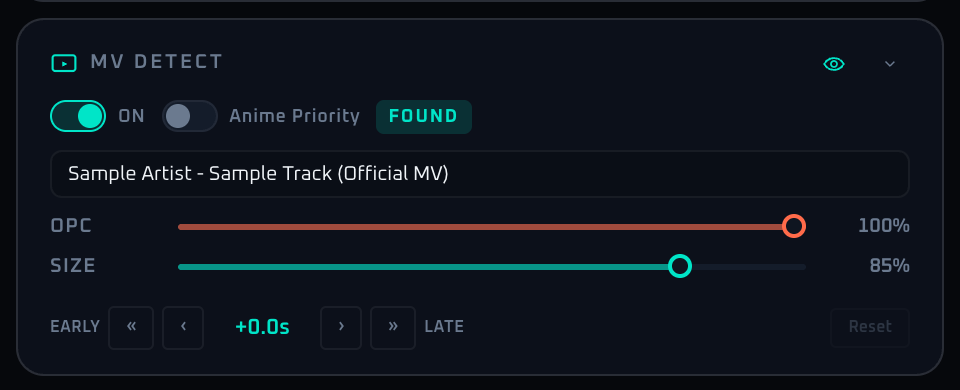
The MV panel takes the recognized song from Song Detect and automatically searches for a matching music video, then layers it on top of the main visual output. Visibility, opacity, size, position, anime preference, and playback offset are all managed here. If the song has no MV or only blocked uploads, the layer hides itself automatically and waits for the next result from the recognition side.
Enabling Anime Priority biases the search toward anime music videos, which is useful for rooms where lip-sync matters. Offset values are saved per song, so once you tune a track, repeat plays use the same correction without further adjustment.
Control Reference
- Visibility toggle (top right, eye icon)
Shows or hides the MV overlay. Detection keeps running, so this is best for temporary hiding.
- MV auto-detect switch (label ON)
Enables or disables MV search and load. When off, the rest of the panel dims and stops accepting input.
- Anime Mode switch
Adds an anime preference hint to the YouTube query so anime MV results are favored. Disabled when MV auto-detect is off.
- Status badge
Loading: searching for the MV.Found: a candidate was loaded and is playing.Not Found: no usable candidate (or all matches were blocked).Quota Exceeded: MV search is temporarily unavailable and recovers after a short wait.
- MV title display (after a successful load)
The MV title is shown clamped to two lines.
- OPC slider (opacity, warm variant, 0–100%, 5% step)
Opacity of the MV layer. Lower values blend with the main visuals, higher values let the MV dominate.
- SIZE slider (20–100%, 5% step)
Scale of the MV overlay. 100% is full-frame; smaller values render a centered inset.
- Offset control group
Compensates for lip-sync drift. Range is ±10000 ms (±10 seconds).
«button: −1000 ms (shift earlier).‹button: −100 ms.- Center value: current offset (e.g.
+1.5s). ›button: +100 ms.»button: +1000 ms.Resetbutton: returns offset to 0 (disabled when auto-detect is off or offset is already 0).
- Collapse arrow
Minimizes the panel.
When To Use It
For sections where the MV should dominate, push size and opacity up; for lyric-heavy sections, lower opacity so the MV becomes background. For tracks where lip-sync matters, dial Offset in ±0.5 second steps during the first few bars and the saved value will carry forward to repeat plays. For anime-heavy events, leaving Anime Priority on permanently keeps the hit rate predictable.
If a workflow is unclear or missing, let us know through the contact form.
Automation-oriented features such as auto lookup and auto rotation unlock with Event Pass.