Overview
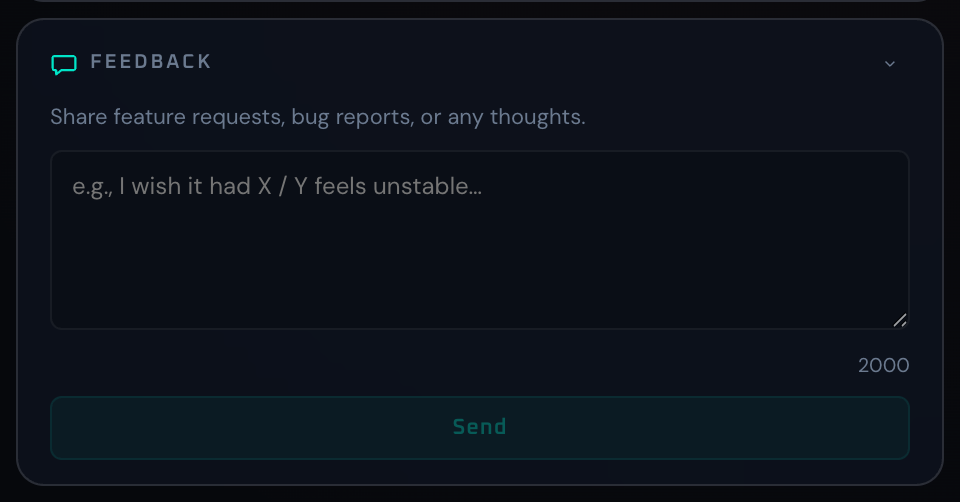
The Feedback panel is a direct input path for feature requests, bug reports, and operational notes from real use. Even short comments are useful here. Submissions are stored in the Firestore feedback collection and inform the development roadmap.
The UI has two states: input and submitted. After submission, the panel switches to a thank-you state with a "Write Another" button so it is easy to send a follow-up. The character limit is configurable; when fewer than 100 characters remain, the counter turns green.
Control Reference
- Intro text (before submit)
Short guidance message at the top of the panel.
- Textarea
Free-form input.
maxlengthis enforced. Disabled while submitting. The placeholder shows an example prompt.- Character counter
Bottom-right indicator showing remaining characters. Turns green (via the
is-lowclass) when under 100 remain.- Error message
Red text shown after a submit failure (network drop, Firestore rejection, etc.).
- Submit button
Persists the body to Firestore. Disabled when the body is empty or whitespace-only, and during submission. While submitting, a spinner appears and the label changes to "Submitting...".
- Thank-you message (after submit)
A confirmation line replaces the form along with the
Write Anotherbutton.- Write Another button (after submit)
Resets the form so another message can be sent.
- Collapse arrow
Minimizes the panel.
When To Use It
Sending feedback immediately after a session is the easiest way to preserve context and reproduction hints. Including the panel, the action you took, and the input you provided makes it easy for the dev side to reproduce. Pro Event Pass users can include their entitlement ID for faster tracing.
If a workflow is unclear or missing, send feedback from the in-app Feedback panel.
Automation-oriented features such as auto lookup and auto rotation unlock with Event Pass.