Overview
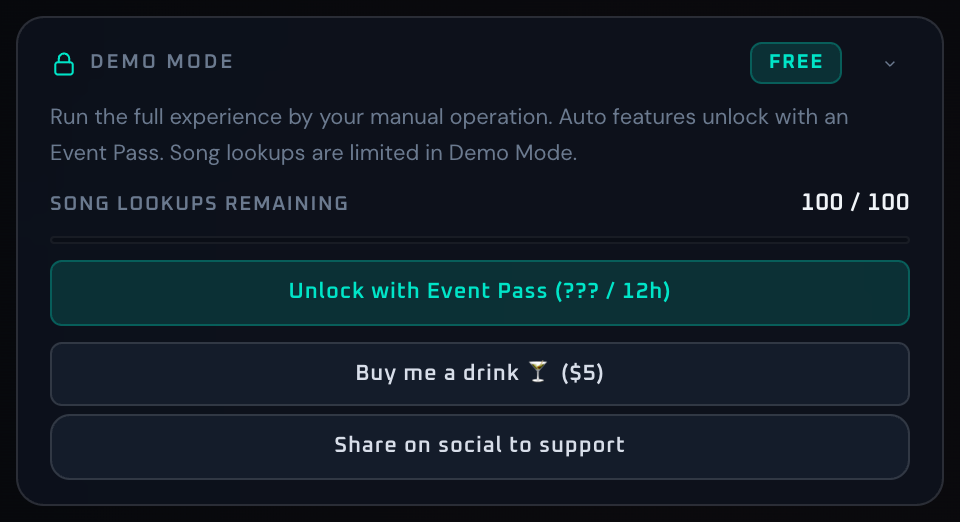
The Demo Mode panel surfaces Demo account state and the paths to keep using the app. It shows remaining song lookups, the upgrade flow to Event Pass, the demo reset purchase, and a social share button. The panel is hidden entirely for users who already hold a Pro Event Pass.
Demo includes the full feature set — auto identify and filter / shader auto rotation are all available. The two constraints are: song recognition is capped at 50 lookups total, and the output carries a logo watermark. When the cap is reached, the song recognition toggle in Song Detect is locked until the count is reset (purchase) or the account is upgraded to Event Pass. DJ timetable automation remains Pro-only.
Control Reference
- FREE badge (top right)
Indicates that the current account is on Demo. While entitlement is loading, the badge is shown in a placeholder state.
- Intro text
A short description covering what Demo includes, the 50-lookup cap, the watermark, and what Event Pass unlocks.
- Remaining count display
SONG LOOKUPS REMAINING {remaining} / {limit}. Color shifts from green toward red as the count decreases; at 0, the value is red and a "Limit reached" note appears below. Before entitlement loads, the value is— / —.- Progress meter
A 0–100% bar reflecting utilization. Turns red at zero remaining.
- Unlock with Event Pass button
Triggers the upgrade flow.
- Reset demo count button
A one-shot ¥500 payment resets the Demo song-lookup counter to zero, restoring the 50 lookups. While processing, a spinner appears on the left and the label changes to "Redirecting...". On completion, a success toast appears in the app.
- Share on social button
Uses the Web Share API if available; otherwise copies the share text to the clipboard. User-cancelled shares (
AbortError) are silently ignored.- Collapse arrow
Minimizes the panel.
When To Use It
Before a serious test session, check the remaining count first so recognition does not stop unexpectedly. The 50 lookups are plenty for home practice or short verification, but a full event needs Event Pass. For occasional top-ups, the demo reset purchase is the quickest path back to a full count.
If a workflow is unclear or missing, let us know through the contact form.
Automation-oriented features such as auto lookup and auto rotation unlock with Event Pass.