Overview
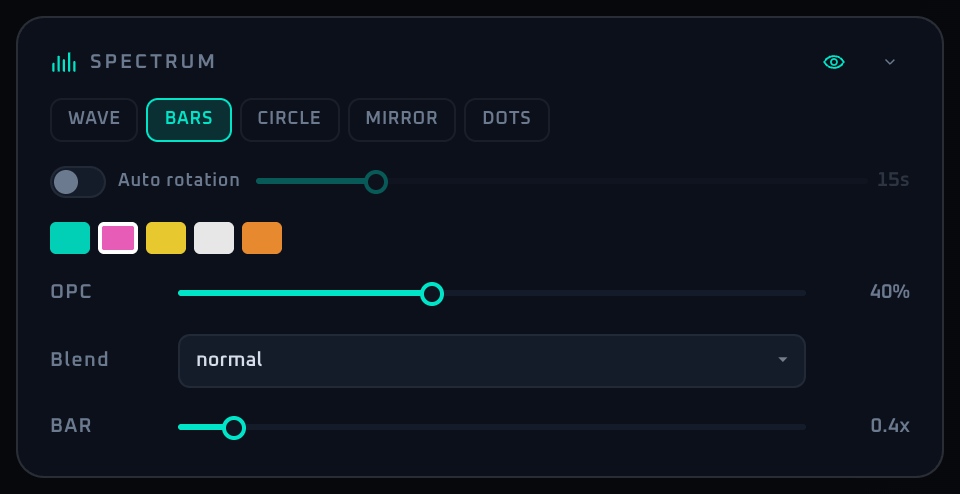
The Spectrum panel controls the waveform / bars (spectrum) that move with the microphone audio and sit on top of the visuals. Because it uses the audio, it works only while the mic is on (press MIC ON in the Audio panel). While the mic is off, the panel shows only the notice "To use this feature, press MIC ON in the Audio panel."
The spectrum is a useful decorative layer, but leaving it on all the time can get busy, so bringing it in and out per genre tends to work better on site. Spectrum auto rotation is available in Demo as well.
Control Reference
- Visibility toggle (eye icon, top right)
Shows or hides the spectrum visualization layer. When off, the SPECTRUM controls below are dimmed.
- Mode buttons (wave / bars / mirror / dots / circle, etc.)
Switches the visualizer drawing mode. Mode-specific thickness sliders appear below.
- Auto rotation switch + interval slider
Rotates the spectrum mode over time. Interval 5–60 seconds in 1-second steps. Available in Demo as well.
- Color palette (5 swatches)
Pick the spectrum color from Cyan, Magenta, Yellow, White, or Orange. Active swatch has a white border.
- OPC slider (opacity 0–100%)
Overall opacity of the spectrum layer. Used to balance against the background video.
- LINE slider (wave / circle modes, 1–10 px)
Stroke width for waveform-style modes.
- BAR slider (bars / mirror modes, 0.2–3×)
Bar width multiplier.
- DOT slider (dots mode, 1–10×)
Dot size multiplier.
- Collapse arrow
Minimizes the panel.
When To Use It
When the frame rate drops sharply or the device gets hot, the spectrum pauses automatically. A banner explains why, and Bring effects back restores it immediately (nothing is paused automatically for a while after you press it). Turning a paused feature back on yourself does the same. If it keeps happening, reduce the load on the device (you can also disable FPS Auto-Optimization in Settings).
If a workflow is unclear or missing, let us know through the contact form.
Automation-oriented features such as auto lookup and auto rotation unlock with Event Pass.